Modular by Philosophy

Build your player around your needs with the plugins, themes and Now Playing layouts you choose. Keep it as minimal, clutter-free and personalized as you want.
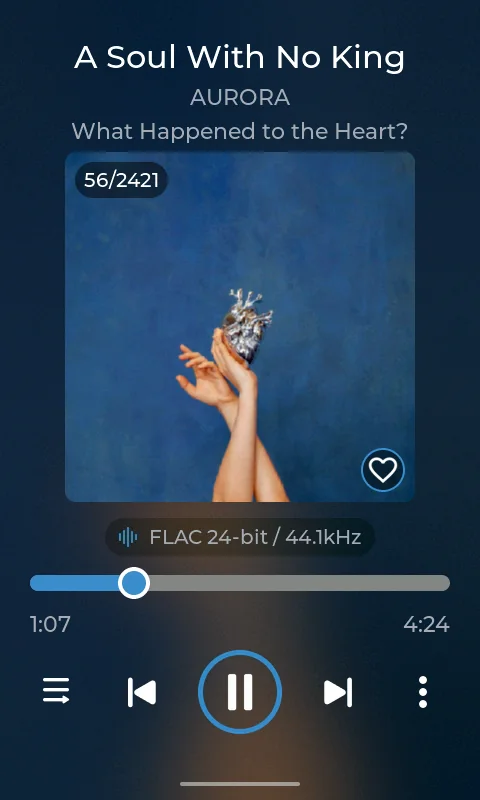
Actual R1 Now Playing screen with AURORA album artwork
Make it yours

Three ways to make Compás your own.

Add features with plugins, change the interface with themes, and choose a Now Playing layout that suits your listening.

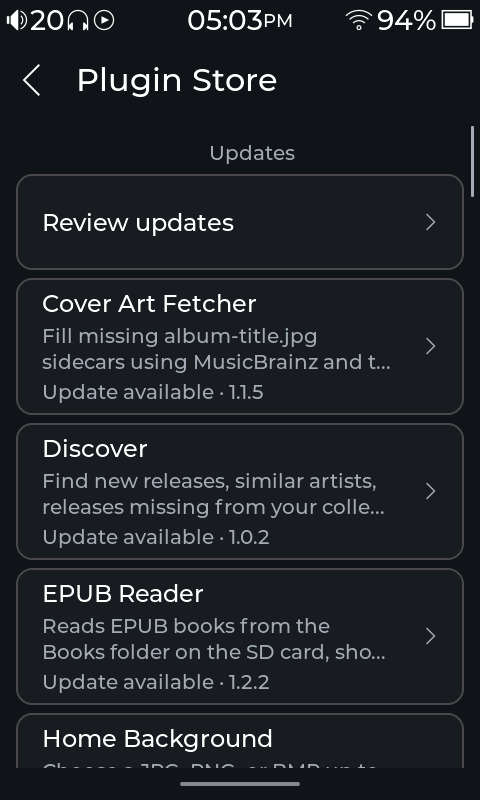
The on-device Plugin Store with optional add-ons
Plugin Store

Plugins

Add audiobook tools, podcasts, audio utilities and other features from the on-device Plugin Store.

  • Install and update add-ons over Wi-Fi.
  • Keep the features you want enabled.
The Arctic Glass theme on the R1 Home screen
Arctic Glass theme

Themes

Change the look across the player. Choose a theme that fits your taste, then adjust the accent color or text size.
  • Choose from installed or downloadable themes.
  • Switch themes in the built-in picker.
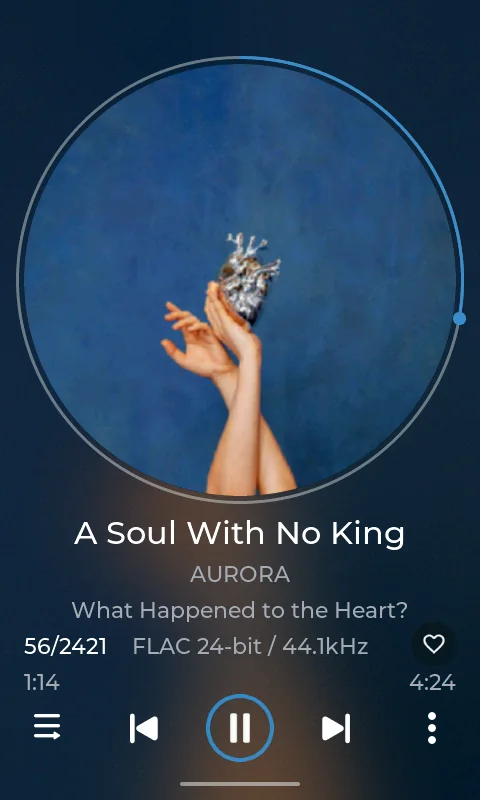
Orbit Now Playing layout playing AURORA on the R1
Orbit layout

Now Playing layouts

Choose how artwork, track details and playback controls are arranged while your music plays.

  • Use a built-in design or download another.
  • Choose a layout separately from your theme.

Real R1 captures from 25 October 2026. Plugins, themes and layouts can be chosen independently.

Explore contributing
Music comes first

Designed for how you listen.

Built for local music playback, headphone listening, and the controls on your player.

01

10-Band Parametric Equalizer

Adjust bass, mids and treble with the built-in 10-band parametric equalizer. Set the frequency, strength and width of each adjustment, or start with a saved profile.

  • Download headphone profiles with the optional AutoEQ plugin.
  • Optional MSEB plugin for adjusting tonal balance.
  • Save and load equalizer profiles; available outputs and controls depend on the device.
Parametric equalizer controls on the R1
Ten-band parametric EQ on the R1.
02

Music and synchronized lyrics

Playback supports formats including FLAC, WavPack, WAV, AIFF, ALAC, APE, Opus, DSD, and SACD ISO. Available formats depend on the player build and audio path.

  • Gapless playback and crossfade are available where supported by the playback path.
  • Follow synchronized lyrics as the song plays.
  • Browse your music by album, artist, title, CUE sheet or folder.
Synchronized lyrics for Abril by Malpaís on the R1
“Abril” by Malpaís · synchronized lyrics on the R1.
03

Remote Control with the Compás App

Android App · Available Now

Keep your player in your bag or coat and control it from your phone. The Android companion connects over local Wi-Fi or Bluetooth to browse your library, manage playback, and transfer files. The built-in browser remote is also available over Wi-Fi without installing an app.

  • Play, pause, skip tracks, and move to a different point in a song.
  • Adjust the player’s volume with your phone’s volume buttons.
  • Control playback from your phone’s lock screen.
  • Browse the player’s SD card and send music from your phone over Wi-Fi.
Compás Remote Transfer screen on a Samsung Galaxy S23, browsing AURORA albums on the player SD card
Transfer music over Wi-Fi with Compás Remote.
Supported Codecs & Formats

Built-in audio formats & playback features

Play your music collection directly without transcoding, from lossless PCM and DSD archives to SACD images and CUE sheets.

Lossless & Uncompressed PCM

Studio & CD Lossless

  • FLAC (.flac)
  • WavPack (.wv — lossless & hybrid PCM)
  • ALAC — Apple Lossless (.m4a, .m4b, .mp4, .alac, .caf)
  • Monkey’s Audio (.ape)
  • WAV / RF64 / Wave64 (.wav, .rf64, .w64)
  • AIFF / AIFF-C (.aiff, .aif, .aifc)
  • Apple Core Audio (.caf — 8/16/24/32-bit PCM, float & ALAC)
1-Bit Direct Stream Digital

DSD & SACD Images

  • DSF — Sony DSD Stream File (.dsf)
  • DFF — Philips DSDIFF (.dff)
  • SACD ISO — Stereo SACD disc images, raw DSD & DST (.iso)
  • WavPack DSD — Compressed native DSD (.wv)
  • Rates: DSD64, DSD128 & DSD256 (44.1 kHz & 48 kHz families)
  • Output: Native DSD / DoP passthrough or filtered 24-bit PCM decimation
Lossy, Playlists & Engine

Lossy Codecs, CUE & Streaming

  • Opus (.opus, .ogg, .oga) & Ogg Vorbis (.ogg, .oga)
  • MP3 (.mp3) & AAC / HE-AAC v2 (.aac, .m4a, .m4b, .mp4)
  • Windows Media Audio — WMA v1/v2 Standard (.wma)
  • CUE Sheets & Playlists — Multi-track .cue splitting, .m3u & .m3u8
  • Synchronized Lyrics — External .lrc files & embedded lyric tags
  • Network Streams — HTTP/HTTPS FLAC, AAC & MP3 streams

*For a faster library scan, use Compás Tools.

Compás Tools Desktop App · Available Now

Your desktop companion for Compás.

Manage your player from your computer: install Compás, keep it up to date, add music and update the library, and install plugins, layouts and themes. Available for Linux (AppImage), Windows (.exe installer or .msi), and macOS on Apple Silicon (.dmg).

  • Install Compás and keep it up to date with guided USB setup.
  • Add music and update the library database as you go, so your music is ready when you unplug.
  • Browse, install and update plugins, Now Playing layouts and themes.
Compás Tools desktop app showing the plugin catalog and available plugins
The plugin catalog in Compás Tools.
Add what you need

More ways to use your player.

Keep Compás focused on music, or add tools for listening, reading and playing.
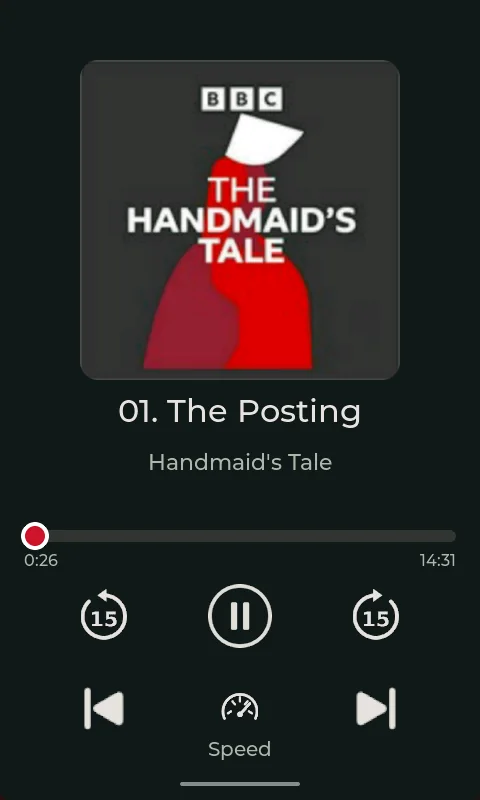
The Handmaid’s Tale audiobook with speed and fifteen-second jump controls
Audiobooks · Reading Room layout

Audiobooks

Pick up where you left off, jump back or forward, and adjust playback speed with the optional Audiobooks plugin.

Alice’s Adventures in Wonderland in the EPUB Reader on the R1
Alice’s Adventures in Wonderland

Books in your pocket

Read EPUB books with the optional EPUB Reader plugin. Browse chapters and continue from your saved place.

Street Fighter II Champion Edition with touch controls on the R1
Street Fighter II · PC Engine

Play between albums

Install optional emulator packages, add your own games, and play with touch controls and the player’s physical buttons.

Supported Hardware

Built for dedicated audio players.

Compás targets dedicated audio players with device-specific hardware and controls.

Official Build

HiBy R3 Pro II

480 × 720 display

Full firmware and player update packages tailored for the HiBy R3 Pro II display, physical controls, and audio hardware.

Official Build

HiBy R3 II (2025)

320 × 480 display

Full firmware and player update packages tailored for the HiBy R3 II (2025) display, physical controls, and audio hardware.

Beta · Hardware tested

TempoTec V1

240 × 320 display

Usable beta build tested on the TempoTec V1. Some features may be missing.

Ready to upgrade your player?

Compás is free and open source under GPL-3.0.